Download the Enshrouded dedicated server tool from Steam, configure the server settings by editing the enshrouded_server.json file, and ensure ports 15636 and 15637 are forwarded for TCP and UDP traffic.
Download and Install the Dedicated Server Tool
To get started with self-hosting an Enshrouded dedicated server, follow these steps:
steps
- Open Steam and navigate to your library.
- Search for "Enshrouded Dedicated Server" in the search bar.
- Install the dedicated server tool as you would install a regular game. It's free if you own Enshrouded.
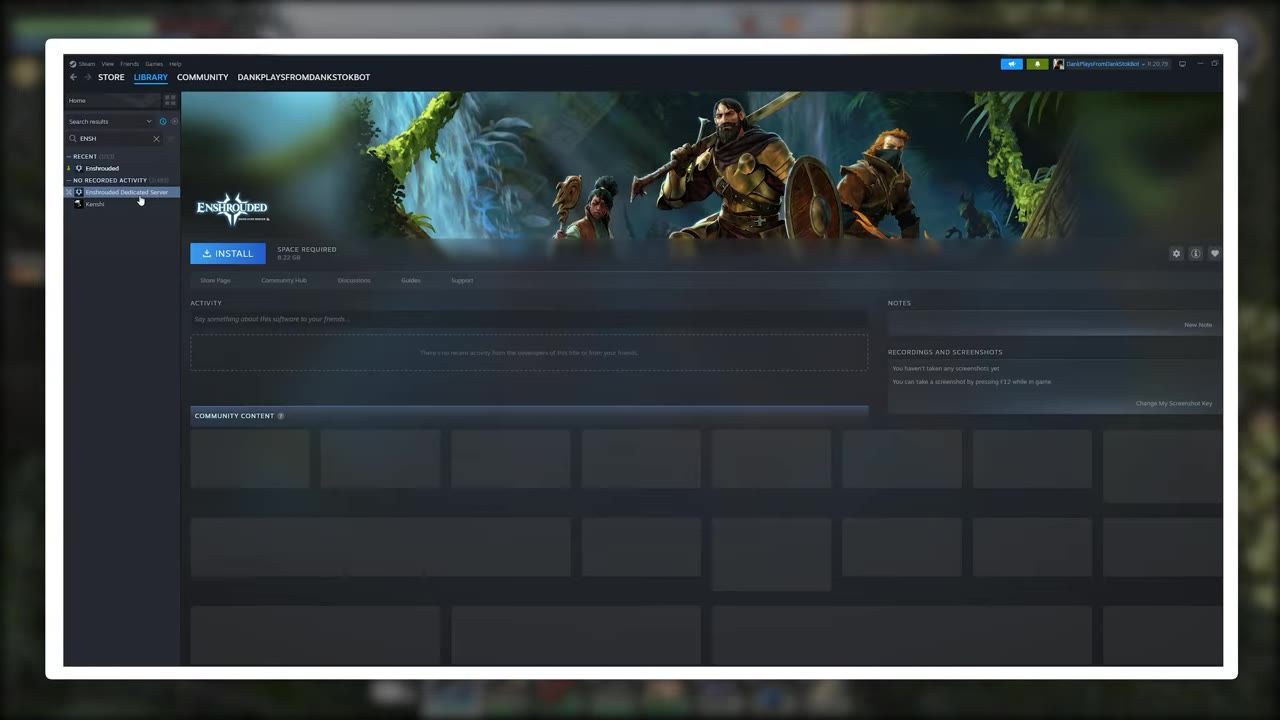
Steam library interface open with the Enshrouded Dedicated Server tool visible and selected. — All Things Hosting
Generate and Configure the Server
Once the dedicated server tool is installed, you need to generate and modify the configuration file:
steps
- Navigate to the installation directory and run
Enshrouded_server.exe. This step generates theenshrouded_server.jsonfile automatically. - Open the
enshrouded_server.jsonin any text editor. - Configure your server settings, including server name (avoid spaces in the name), password, player slot count (up to 16), and other details.
- Leave the default ports (15636 and 15637) unchanged unless you're managing multiple servers on the same machine.
- Save your modifications to ensure they're applied.
Enable Port Forwarding and Adjust Firewall Settings
To allow connections from players outside your local network, follow these critical steps:
Starting Your Enshrouded Server
After setting up port forwarding and configuring the server, you're ready to launch:
steps
- Run
Enshrouded_server.exeto start your server. - To reliably connect, use the Steam client. Go to
View > Game Servers > Favorites, click the plus (+) button, and add your server's public IP address along with port 15636. - Inform friends to repeat the process using your public IP for multiplayer access.
Console Players and Third-Party Hosting Options
Console players cannot host their own servers for Enshrouded but can join multiplayer servers through alternative options.
Alternative Hosting Options
- For console players: Use the in-game server browser to join public servers or consider renting private servers from third-party hosting services.
- For dedicated 24/7 hosting: Use external services for guaranteed uptime, better performance, and added features without relying on personal hardware.
Consider external hosting for guaranteed uptime and performance. — All Things Hosting
Troubleshooting Connection Issues
If you're encountering issues while hosting or connecting to an Enshrouded dedicated server, verify some common problem areas:
FAQ
How to set up an Enshrouded dedicated server?
To host your own dedicated server, download the "Enshrouded Dedicated Server" tool from Steam, run Enshrouded_server.exe to generate the configuration file, edit the file (enshrouded_server.json) for server settings, forward ports 15636 and 15637 for TCP and UDP traffic on your router, and add the executable to Windows Firewall exceptions. Finally, start the server and invite players using the Steam favorites method.
How do I fix connection issues to my Enshrouded server?
Ensure ports 15636 and 15637 are forwarded correctly for both TCP and UDP. Verify that enshrouded_server.json is properly configured and confirm that Windows Defender Firewall isn't blocking enshrouded_server.exe. Use the Steam favorites method to add the server via its public IP address and port when the in-game browser fails to show it.
Can console players host an Enshrouded dedicated server?
No, console players cannot host dedicated servers. They can only join multiplayer servers through the in-game browser or rent private servers from external hosting services.
What are the advantages of third-party server hosting?
Third-party hosting services provide reliable uptime, excellent performance, and avoid tying up personal hardware to keep Enshrouded servers running 24/7. They also offer additional features like backups, scheduling, and detailed analytics.
Sources
Screenshots on this page are frames from the videos below, used to illustrate the steps they describe. All rights remain with their creators.
- How to Host an Enshrouded Dedicated Server for FREE (2026) — All Things Hosting, August 4, 2026
Checked against:
- We're still cooking for 1.0. Here's some news you may have missed! — CoolUsernameBro, 2026-08-27
- Changelog for Hotfix #42 v.0.9.1.2 — CoolUsernameBro, 2026-06-29